Canada free tax filing software
The first thing most people look for when filing taxes in Canada is the right canada free tax filing software for their situation. Among CRA-certified web-based options, two names come up more than any other: Wealthsimple Tax and TurboTax Free. If you don’t have your Social Insurance Number ready yet, see our guide on how to apply for and manage your SIN in Canada.
💡 Key Takeaways
- TurboTax Free is the better fit for a simple return T4 employment income, tuition, and standard deductions.
- Wealthsimple Tax covers more complex situations at $0 stock and crypto trading, self-employment/freelance income, and rental income all included.
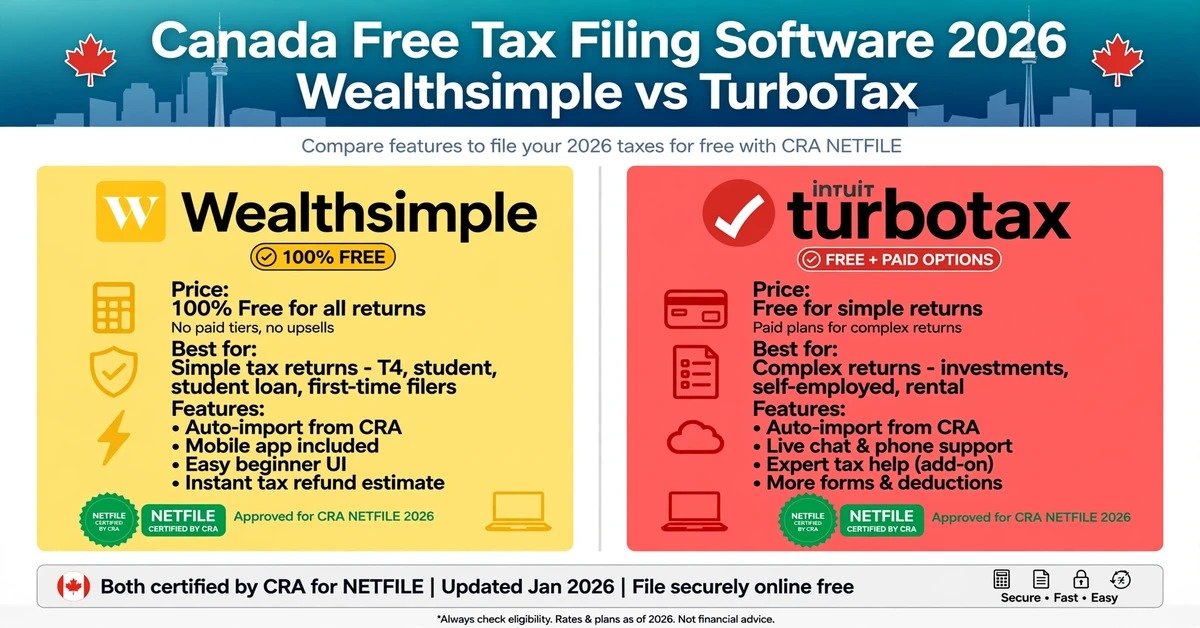
Choosing canada free tax filing software: Wealthsimple Tax vs TurboTax Free
Both platforms support NETFILE submission to CRA, and both connect to Auto-fill My Return to pull in your basic slips automatically. Where they differ is how much of your tax picture actually stays free. Picking the right canada free tax filing software for your income structure makes a real difference here.
| Comparison | Wealthsimple Tax | TurboTax Free |
| Base cost | $0 (donation-based, optional) | $0 for a qualifying Simple Return |
| NETFILE e-filing | Supported | Supported |
| CRA Auto-fill | Supported | Supported |
| T4 employment / T2202 tuition | Free | Free |
| RRSP deduction | Free | Free |
| Self-employment / freelance income | Included in free tier | May require upgrade to a paid plan |
| Rental income | Included in free tier | May require upgrade to a paid plan |
| Stock and crypto investments | Included in free tier | May require upgrade to a paid plan |
| Medical expenses / donations | Included in free tier | May require upgrade to a paid plan |
| Interface style | Scroll-and-fill form | 1:1 interview-style wizard |
One thing worth knowing: the most common frustration people run into is starting a return, then hitting an unexpected paywall once a specific slip like a T5008 for capital gains gets added mid-filing. Checking your full list of tax slips before you start can save you that surprise.
Wealthsimple Tax Handles Complex Income Without the Upsell
Wealthsimple Tax’s biggest strength is that a more diversified income situation doesn’t cost you extra.
Free Support for Investments, Self-Employment, and Rental Income
If your income goes beyond T4 employment to include stocks, crypto, or self-employment earnings, Wealthsimple holds up as one of the strongest canada free tax filing software options available. It also supports up to two returns per account, which is handy if you’re filing alongside a spouse or partner.
TurboTax Free Is Built for First-Time and Simple T4 Filers
TurboTax Free walks new filers through an intuitive, conversational interview format a gentler entry point if this is your first Canadian tax return.
The Step-by-Step Wizard Keeps It Simple
You fill out your return just by answering questions, which makes TurboTax the most beginner-friendly canada free tax filing software for anyone whose income is mostly T4 employment. If you’re in Canada on a working holiday visa or as an international student, your residency status can affect your refund this working holiday tax refund guide explains how it’s calculated.
Which Software Actually Fits Your Situation?
- Case 1 — T4 employment income only: TurboTax Free’s step-by-step wizard is genuinely convenient here.
- Case 2 — Tuition (T2202) and RRSP involved: Either platform handles this smoothly at $0. To understand how contributions affect your taxable income, see how RRSP and TFSA tax savings work in Canada..
- Case 3 — Stocks, crypto, self-employment, or rental income: Wealthsimple Tax’s wider free coverage makes it the more sensible pick.
The 5-Step NETFILE Process (Applies to Either Platform)
However you choose, filing follows the same general steps once you’re inside the software.
- Create your account and enter your basic details: name, address, SIN, date of birth, and residency status.
- Connect CRA Auto-fill My Return: link CRA My Account to automatically pull in your T4, T5, and RRSP information.
- Manually enter anything Auto-fill missed: medical receipts, donations, self-employment expenses, and other items that don’t sync automatically.
- Review your calculated return: confirm your estimated refund or balance owing before submitting.
- Submit through NETFILE and save your confirmation number: after you click submit, CRA issues a Confirmation Number keep it somewhere safe.
You can always verify current certification and eligibility requirements directly on the official CRA NETFILE website
Common Mistakes With Free Tax Filing
- Starting based on the word “free” alone: check upfront whether your specific income types actually fall within that program’s free tier.
- Trusting Auto-fill a little too much: some deductions medical expenses, donations don’t sync automatically, so cross-check against your real documents.
- Not actually submitting through NETFILE: reaching the calculation summary screen isn’t the same as filing. Whichever canada free tax filing software you use, your return isn’t complete until you get that final confirmation number.
FAQ
Yes. Both Wealthsimple Tax and TurboTax are officially certified through CRA’s NETFILE program and meet its security requirements.
Not necessarily. With Wealthsimple Tax, self-employment income, stock trades, and crypto-related forms can all be filed at $0 with no extra cost. It’s worth checking which canada free tax filing software actually matches your specific situation before you commit to one.
Disclaimer: This is for general information only. Please consult a licensed professional or the relevant government agency for your specific situation.
Conclusion / CTA: Match the software to your income type, run through the 5-step NETFILE process, and don’t stop until you’ve got that confirmation number.